


Frontline Education
4.72.23K Reviews
App Specs
- Version
- 11.11.1
- Updated On
- License
- Free
- Downloads
- 500,000+
- Developer
- Frontline Education
- Categories
- Education
- Platform
- Android
Screenshots

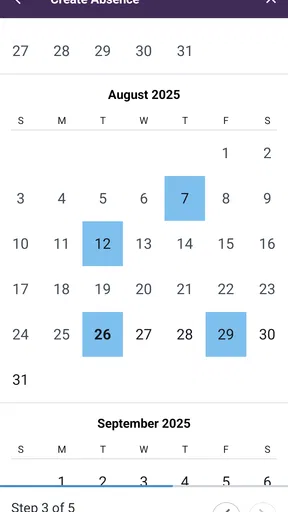
 Analysis by AppCompare
Frontline Education is the kind of education app I would recommend only after understanding how your school or district handles staff leave. It is not a general classroom tool, lesson planner, or student study app. Instead, it gives employees a mobile way to check leave balances, arrange absences, and handle related tasks connected with Frontline Education’s systems. In my experience, that narrow purpose is also its main strength: when you need to deal with an absence away from a computer, a focused staff-management app can be much more useful than a broad education platform.
The app is free to download and is aimed at everyone from an age-rating perspective, although its practical audience is mainly teachers, school employees, and other staff whose organizations use Frontline Education. It has reached more than half a million installs and holds a 4.7 average from around 4.7 thousand ratings, with roughly 2.2 thousand written reviews. Those figures suggest a generally positive reception, but they do not change the most important question: whether your employer has connected you to the Frontline system in the first place.
How Frontline Education feels in everyday use
My first impression is that this is a utility app rather than something I would open casually. Its value appears at specific moments: before requesting time away, while checking whether enough leave is available, or when I need to make sure an absence has been recorded properly. That makes the experience less about browsing and more about completing a small administrative job without opening a desktop browser.
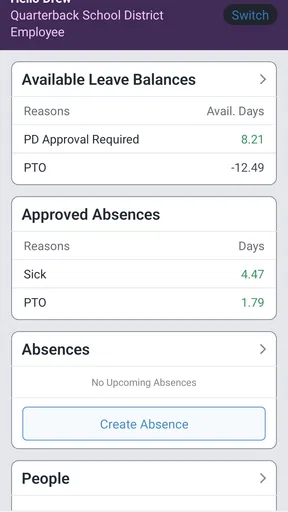
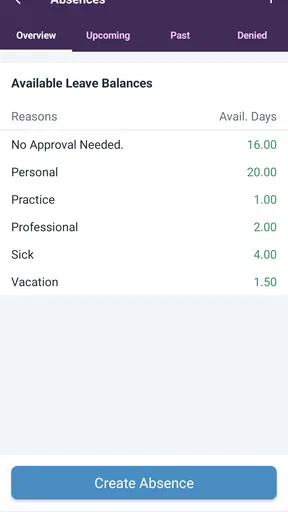
The central workflow is easy to understand. I would expect to sign in through the organization’s Frontline setup, review my available leave, and then schedule an absence using the information shown in the account. The appeal is obvious for school staff who move between classrooms, meetings, buses, or home and do not want to wait until they are back at a computer. A quick mobile check can help prevent the common mistake of requesting time off without knowing the current balance.
There is an important distinction between convenience and independence here. The app does not replace the rules established by a school or district. Approval procedures, available leave categories, substitute arrangements, and internal deadlines remain part of the organization’s process. I see Frontline Education as the mobile doorway into that process, not as a personal calendar that can decide whether an absence is accepted.
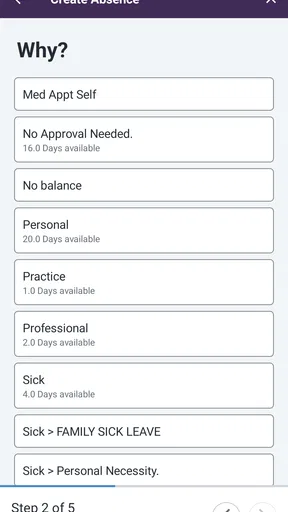
A realistic example would be a teacher who realizes late in the afternoon that a medical appointment will conflict with the next school day. Instead of waiting to reach a work computer, the teacher can use the app to check the relevant balance and submit the absence while the details are fresh. That does not guarantee approval, but it reduces the delay between noticing the problem and notifying the right system. For staff, that small reduction in friction can matter more than a long list of extra features.
Useful for staff who need quick checks
The strongest use case is checking information before acting. Leave balances are easy to forget, especially when different types of time off are tracked separately by an employer. Having that information available on a phone can make planning more deliberate. I would use it before booking a personal appointment, arranging travel, or asking for a day away, rather than treating the app as an after-the-fact record.
Worth Reading Before You Choose

EA SPORTS FC Mobile 26 Is a Bigger Football Game, but It Takes Time

Flipboard Shows What News Apps Must Do Beyond the Feed

Switching to Android Auto Means Rethinking Your Driving Routine

Google Calendar Makes a Crowded Week Easier to Manage

Ludo King Makes the Most of the Minutes Between Plans

Baby Panda World Brings Quick Play to Modern Phones, but Its Game Library Feels Busy
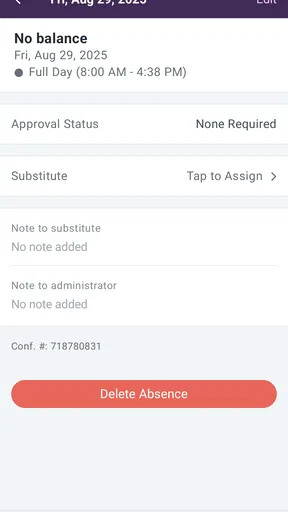
Scheduling an absence from a mobile device is another practical advantage. A desktop portal may offer more room and possibly more surrounding information, but the phone is usually closer when an unexpected situation arises. The app is therefore most valuable for short, time-sensitive actions. It is less important for staff who only submit leave occasionally and already have a reliable computer-based routine.
I also like the possibility of using the app as a confirmation step. After submitting an absence, I would check the account again rather than relying on memory or assuming that tapping a button completed every part of the process. This is one of the less obvious habits that can prevent confusion: use the mobile app to initiate the request, then verify the resulting status through the information available in the Frontline account or the organization’s normal communication channel.
Where the mobile format helps and where it does not
A phone interface is convenient, but it can make administrative details easier to overlook. When a request involves several dates, different leave types, or notes that need careful wording, I would slow down and review every field before submitting. The smaller screen is excellent for a quick balance check, but not always ideal for complicated planning.
That trade-off is worth remembering when comparing the app with a usual desktop portal. A browser-based system is often better when I want to examine a longer history, compare several dates, or work with multiple pieces of information at once. Frontline Education makes more sense as the fast-access companion for routine staff actions. I would not choose the phone app as my only method for handling an unusual or high-stakes absence.
The app also depends heavily on the organization’s setup. If a school or district does not use Frontline Education for its employee workflows, installing the app alone will not create a leave system. This is the first question I would ask before downloading it: does my employer provide Frontline access, and which functions have been enabled for my account? That check can save time and avoids mistaking a workplace tool for a universal education app.
What the developer’s current release tells me
Frontline Education is developed by Frontline Education, and the current version is 11.11.1. The app was released on March 6, 2017, so it has had a long presence as a mobile option for education staff. I would read that history as a sign that the product is intended to support an established administrative workflow rather than chase novelty.
The version information is useful, but I would not treat a newer version number as proof that every part of the experience has changed. A release can improve compatibility, correct problems, or refine existing screens without altering the basic purpose of the app. The current evidence supports viewing it as a maintained mobile access point for Frontline services, not as a completely redesigned employee-management platform.
For existing users, that distinction matters. If the app already fits the way your district handles absences, an update may be valuable simply because it keeps the sign-in and scheduling experience usable on supported phones. If you are hoping for a broader replacement for email, calendars, payroll tools, or staff communication, the version number alone gives me no reason to expect that transformation. I would judge the release by whether the everyday leave workflow remains dependable.
The minimum operating-system requirement is Android 8.0, which keeps the app available to people using older supported Android devices while still setting a clear boundary. Before relying on it for work, I would check the phone’s Android version and update the app through the normal store process. A staff member using an older device should also keep an alternative way to reach the organization’s portal, because administrative access is not something I would leave to one phone application.
How it compares with ordinary alternatives
The most obvious alternative is a desktop browser. For a detailed review of past leave, a complex request, or a task involving several screens, I would probably prefer the larger display. The browser gives me more context and makes it easier to reread dates before confirming them. The app wins when speed and availability matter more than workspace.
Email is another common alternative, but it creates a different kind of risk. An email to a manager may communicate an intention, yet it may not update the official leave record or balance. Frontline Education is more useful when the organization expects requests to be entered into its formal system. I would still follow any required email or supervisor notification, but I would not assume that sending a message is equivalent to submitting the official absence.
A personal calendar can help me remember an appointment, but it cannot reliably show the organization’s current leave balance or approval state. I see the calendar as a companion, not a substitute. One practical workflow is to submit the absence through Frontline Education, then place the appointment in a private calendar only after checking the dates. That keeps personal planning separate from the official record while reducing the chance of double-booking.
Generic employee scheduling apps may offer more customization, but that flexibility is not automatically better. A school employee usually needs the system recognized by the district, not another independent tracker that colleagues and administrators may not see. Frontline Education is the better choice when institutional compatibility is the priority. A different app is better only when the workplace does not use Frontline or when the user wants personal planning rather than official leave management.
Small habits that make the app more reliable
I would begin by checking the leave balance before entering dates, not after. This sounds obvious, but it changes the workflow from “submit and hope” to “plan with the available information.” If the balance looks unexpected, I would pause and contact the appropriate workplace administrator rather than repeatedly submitting requests or assuming the app is wrong.
I would also review the selected dates and absence details on the final screen before confirming. Mobile interfaces can make a nearby date easy to tap accidentally, particularly when I am rushing. Taking a few seconds to verify the first day, last day, and applicable leave category is a better habit than trying to correct an error later.
A third useful habit is to avoid treating the app as proof that everyone has been notified. The official record and the human communication around an absence may be separate responsibilities. After using the scheduling function, I would follow the school’s normal notification process if one exists. This is a key trade-off: the app can streamline the formal entry, but it cannot replace local workplace expectations.
For people who frequently work away from a desk, I would keep the app ready but not depend on it blindly. If the phone is low on battery, the connection is unreliable, or sign-in becomes difficult, knowing the desktop route and the correct contact person is useful. A mobile tool improves access; it does not eliminate the need for a backup plan.
Who should use it and who should skip it
I think Frontline Education is a good fit for teachers and school employees whose district already uses Frontline for leave and absence management. It is especially suitable for someone who regularly needs to check balances or submit requests outside office hours, between duties, or while away from a desk. The free price removes a financial barrier, and the Everyone age rating makes it broadly accessible from a store perspective.
I would be more cautious if you are a student, parent, private tutor, or job seeker looking for learning materials. This is categorized as an education app, but its role is administrative rather than instructional. It will not replace a study platform, digital classroom, or lesson resource. The name may sound broad, yet the practical experience is centered on staff leave and absence-related tasks.
I would also skip it if your employer uses another platform or handles leave entirely through a separate human-resources system. In that situation, the app is unlikely to solve the problem you actually have. Likewise, staff who submit one request a year from a computer may find that installing another workplace app adds little value. The strongest reason to use it is repeated, legitimate access to a Frontline-managed account.
Remaining friction and what I would watch
The main limitation is not the idea of mobile leave management; it is the dependence on organizational configuration. The experience can differ in usefulness according to how a district structures its absence process. A clean balance check is helpful, but a user may still need separate steps for approval, notification, or substitute coverage. I would keep those boundaries in mind before assuming the app handles the entire absence from start to finish.
I would also watch how the current release affects existing users over time. The most meaningful improvements for this kind of tool are practical: dependable sign-in, clear status information, accurate balances, and a smooth path from checking leave to recording an absence. Those matter more to me than visual changes. Since version 11.11.1 is the current release, I would pay attention to whether future updates preserve familiar workflows while making complicated requests easier to review on a phone.
Another point worth watching is the balance between mobile simplicity and administrative detail. A streamlined screen is welcome for a one-day absence, but users may need more context when requests involve several dates or categories. The best future direction would be clearer confirmation and review without turning a quick staff task into a crowded form. I would rather see fewer surprises and better visibility than a long list of decorative additions.
After using it as a focused workplace tool, my opinion is positive but specific. Frontline Education is not an all-purpose education companion, and it should not be judged by that standard. Its value comes from making Frontline-managed leave information and absence scheduling available in a more convenient place. The 4.7 average and broad install base support the impression that many users find that role worthwhile, while the app’s limitations remind me to check employer compatibility first.
My recommendation is simple: use it when your school or district already relies on Frontline and you want faster access to official leave tasks. Keep a browser or workplace contact as backup, verify every date before submitting, and remember that local approval rules still matter. With those expectations, the app can remove a surprisingly annoying part of school administration. Without that organizational connection, it is not the right download, no matter how useful the central idea sounds.
Pros
- Centralizes school tools
- calendars
- forms
- and communication in one place.
- Push notifications help users stay updated on important school announcements.
- Supports multiple Frontline services through a single mobile experience.
- Useful for managing absences
- schedules
- and education-related tasks on the go.
- Available for both Android and iOS devices with a familiar mobile interface.
Cons
- Some features require an account provided by a participating school or district.
- The app’s usefulness varies depending on which Frontline services are enabled.
- Users may receive too many notifications if alert settings are not customized.
- Occasional login or loading issues can make urgent tasks inconvenient.
- Certain actions may still redirect users to web pages instead of native screens.
FAQs for Frontline Education
What is Frontline Education used for?
Frontline Education is a platform designed to help schools and education organizations manage administrative, HR, professional development, absence management, recruiting, payroll-related tasks, and other operational processes. The exact tools available depend on the products purchased by your school or district. It is not a general learning app for students, so users should confirm which Frontline services their organization supports before downloading or signing in.
Can I use the Frontline Education app without a school or district account?
Generally, no. Frontline Education services are intended for employees, administrators, substitute teachers, applicants, and other users connected to an organization that uses Frontline products. You normally need an account created or authorized by your school district, employer, or institution. Downloading the app alone does not provide access, and your available features may vary depending on your role and the specific Frontline modules enabled by your organization.
Which Frontline Education features are available in the mobile app?
The mobile experience may allow eligible users to review schedules, manage absences, accept or view substitute assignments, receive notifications, access professional learning information, or complete other organization-specific tasks. However, Frontline has several products and not every feature is available in every app or account. After installation, the options displayed depend on your employer’s configuration, permissions, and the Frontline services linked to your login.
Is Frontline Education easy to use for employees and substitute teachers?
The app is relatively straightforward for routine actions such as checking assignments, submitting an absence, viewing notifications, or accessing account information. Nevertheless, the interface can feel confusing when an organization uses multiple Frontline products or requires separate login steps. New users may need instructions from their district, especially for account activation, PINs, absence rules, approval workflows, and understanding which tasks must still be completed through the web portal.
Is Frontline Education safe, and what should I do if I cannot log in?
Frontline Education handles organizational and employment-related information, so users should download it only from the official Google Play Store or Apple App Store and keep the app updated. If login fails, check your username, password, organization details, internet connection, and any required verification process. If the problem continues, contact your school district or employer’s Frontline administrator, because account permissions and password resets are usually managed by the organization.


